Product case study, AI-assisted learning design

CoCreate

A tool that turns a folder of manuals and training documents into a finished, ready-to-publish learning course, narrated by AI and supervised, at every step, by a human.

RoleProduct design, end to end
SurfaceDesktop web
FocusTrust & human control in an autonomous workflow
Scroll
THE IDEA

What if the AI didn't just draft a lesson, but built the whole course?

CoCreate's premise is that an AI shouldn't just turn a manual into draft text. Given a folder of source documents, it should be able to structure the material into modules and lessons, write the learning content for each topic, curate the media to explain it (narrated video assembled from image trails pulled from the source and the wider web), and generate the quizzes that test what it just taught.

That's a lot of unattended work: choosing source material, sourcing outside video, writing assessment questions. The moment an AI is trusted with that much of the course, the interface's job stops being "show a progress bar" and starts being make the work legible, so the person overseeing it always knows what's being built, and why, long before a finished course lands in their lap.

THE PERSON

Jordan is a training manager at a manufacturing company, running a batch of 12 safety and maintenance documents through CoCreate. Jordan needs to follow what the AI is doing, redirect it when something's off, recover from a bad pick without losing the rest of the batch, and decide when a generated course is actually ready to publish.

DESIGN PRIORITY

Transparent first. Fast second.

Because CoCreate is doing this much on its own, the priority wasn't speed. It was making sure Jordan never has to just take the output on faith.

01

Narrate reasoning, not percentage

The dashboard's briefing panel writes out what CoCreate is doing, what it's concluded, and what's next, in plain language, not a loading bar.

02

Explain flags, don't silently fix

When something's wrong (a mismatched video, a plagiarism concern) the Attention Center says why it was flagged instead of quietly swapping it out.

03

Scope every instruction forward

Steering only ever touches what hasn't been built yet. Completed modules stay exactly as they were generated.

04

Make publishing a decision, not a step

Nothing in the pipeline skips the human review before a course goes live. That gate is deliberate, not a formality.

USER FLOW

One dashboard, four jobs

The flow starts the moment a batch is already underway. Everything (watching progress, steering unbuilt lessons, recovering from a flagged asset, deciding what to do with a finished draft) happens from the same dashboard, without ever pausing the pipeline.

Hub screen Panel / step Decision point Outcome
Batch underway: 12 documents processing
↓
Project Dashboard
↓
Project Briefing
Progress Metrics
Source Document Pipeline
Workflow Pipeline
Current Creation (WIP)
Curriculum Assembly
01 · understand what's happening right now
02 · PROJECT STEERING
Select any queued document
↓
Add / edit instructions
↺ returns to Dashboard, only unbuilt lessons are affected
03 · TROUBLESHOOTING & RECOVERY
Attention Center flags an issue
↓
Jordan chooses the fix
↺ rest of the batch keeps running throughout
↓
See live preview
↓
Preview page: course as a learner would see it
04 · review the finished draft and decide
Save draft
Review course
Publish for admin review
01 UNDERSTAND PROGRESS

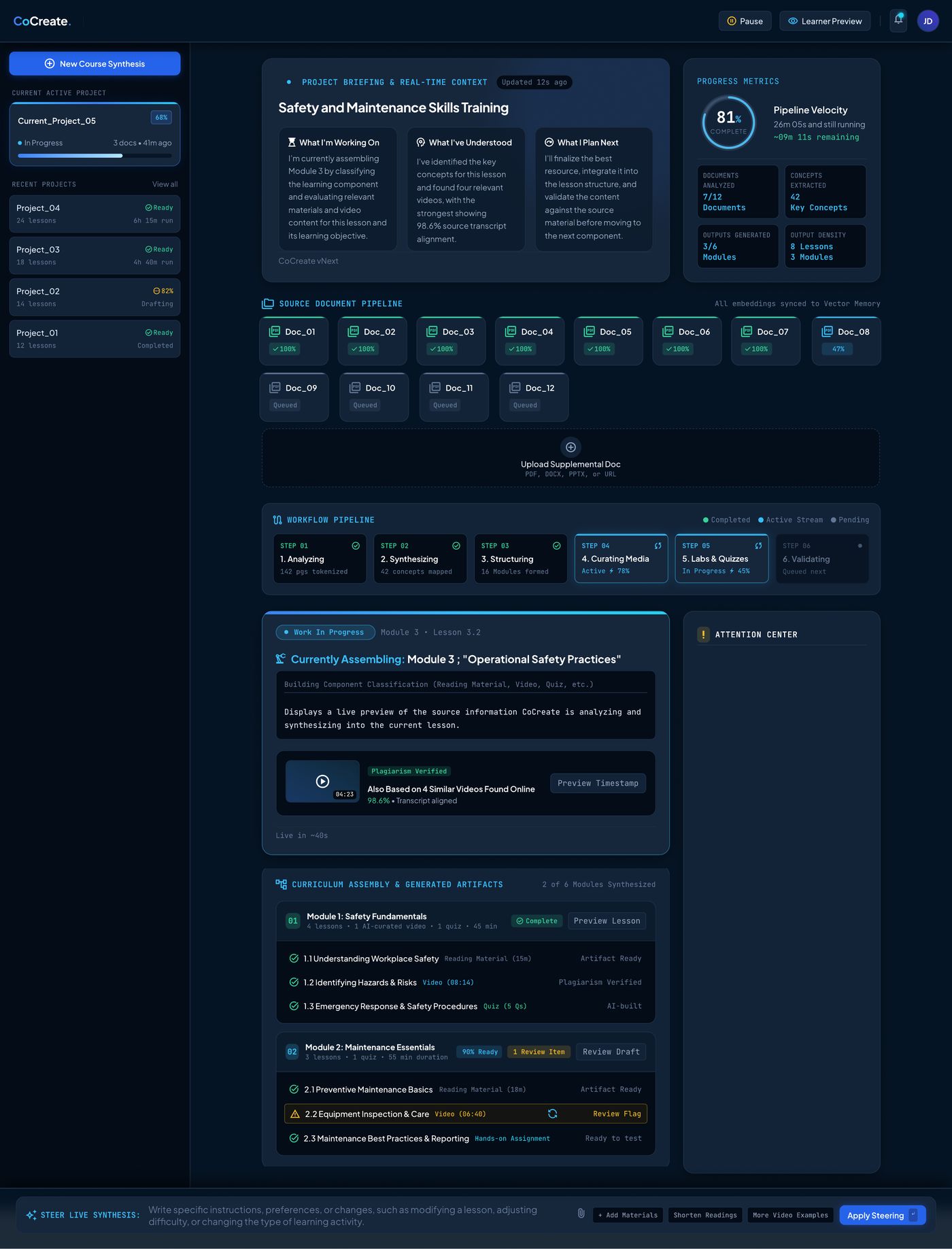
Knowing what's happening right now

Each panel on the dashboard answers a different question, so Jordan never has to guess where to look. Project Briefing narrates what CoCreate is doing and plans next in plain language. Progress Metrics gives the numbers underneath. Source Document Pipeline and Workflow Pipeline show file and step status at a glance, while Work in Progress and Curriculum Assembly track the current lesson and the modules already finished.

Screen · Dashboard
CoCreate dashboard showing project briefing, progress metrics, source document pipeline, workflow pipeline, and curriculum assembly while a batch is processing
02 STEER WHAT'S NOT DONE YET

Changing instructions for unprocessed documents

Hovering a queued or in-progress document lets Jordan add instructions for that specific file before CoCreate touches it, so completed modules stay untouched. A global "Steer Live Synthesis" bar at the foot of the dashboard handles instructions meant for everything still ahead in the batch.

Screen · Dashboard, Source Document Pipeline
Source document pipeline with queued documents and the steer live synthesis instruction bar
03 HANDLE ONE FAILURE

Recovering without losing the rest of the batch

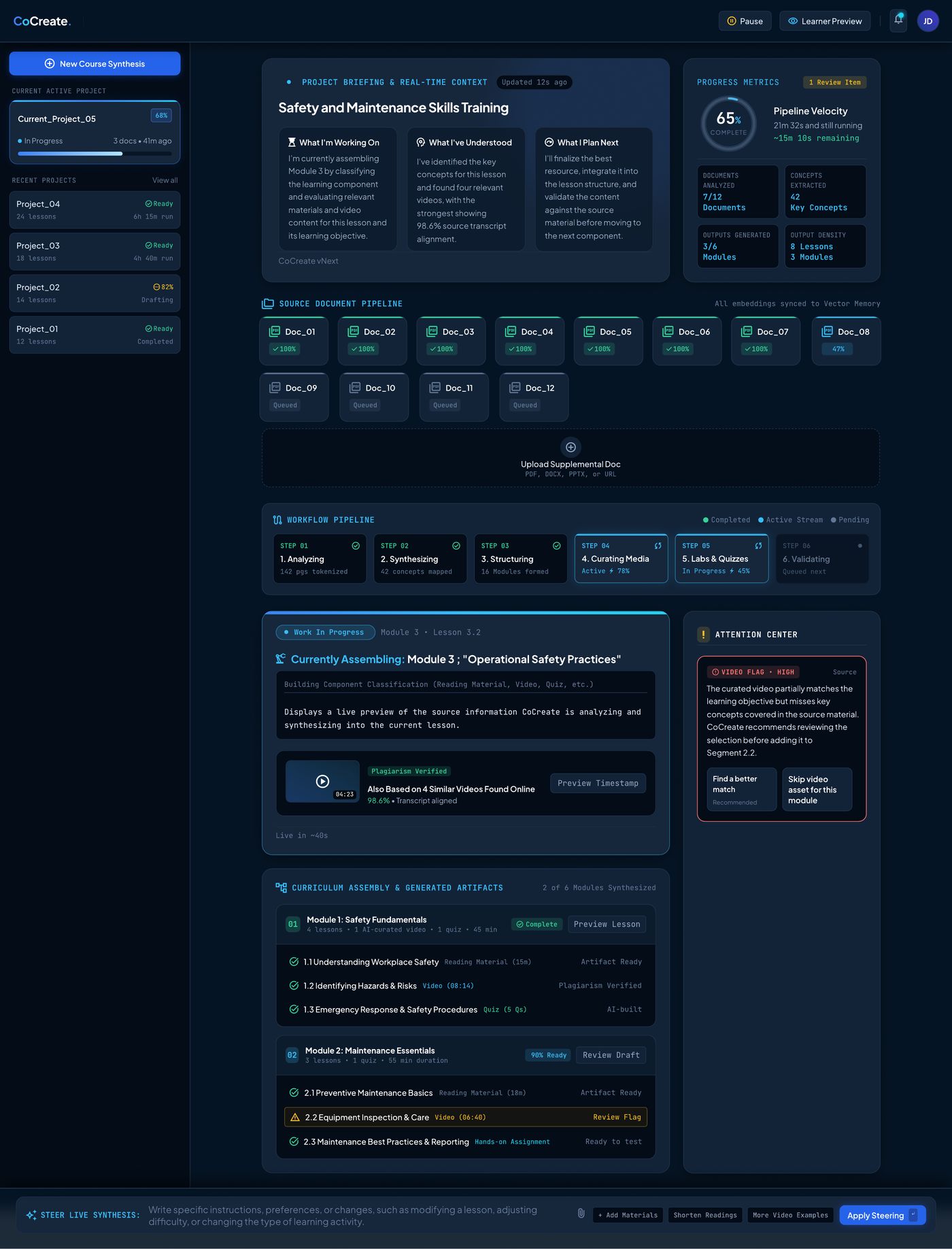
Flagged issues (a mismatched video, a plagiarism concern) go to the Attention Center while the rest of the batch keeps running. If the flag has already reached Curriculum Assembly, that module is highlighted so Jordan knows it isn't clear yet. CoCreate recommends a fix; Jordan decides.

Screen · Dashboard, Attention Center & Fixing Errors
Attention center showing a flagged video with recommended fix options while module two shows a review flag
04 REVIEW & DECIDE

Closing out the batch and choosing what happens to the drafts

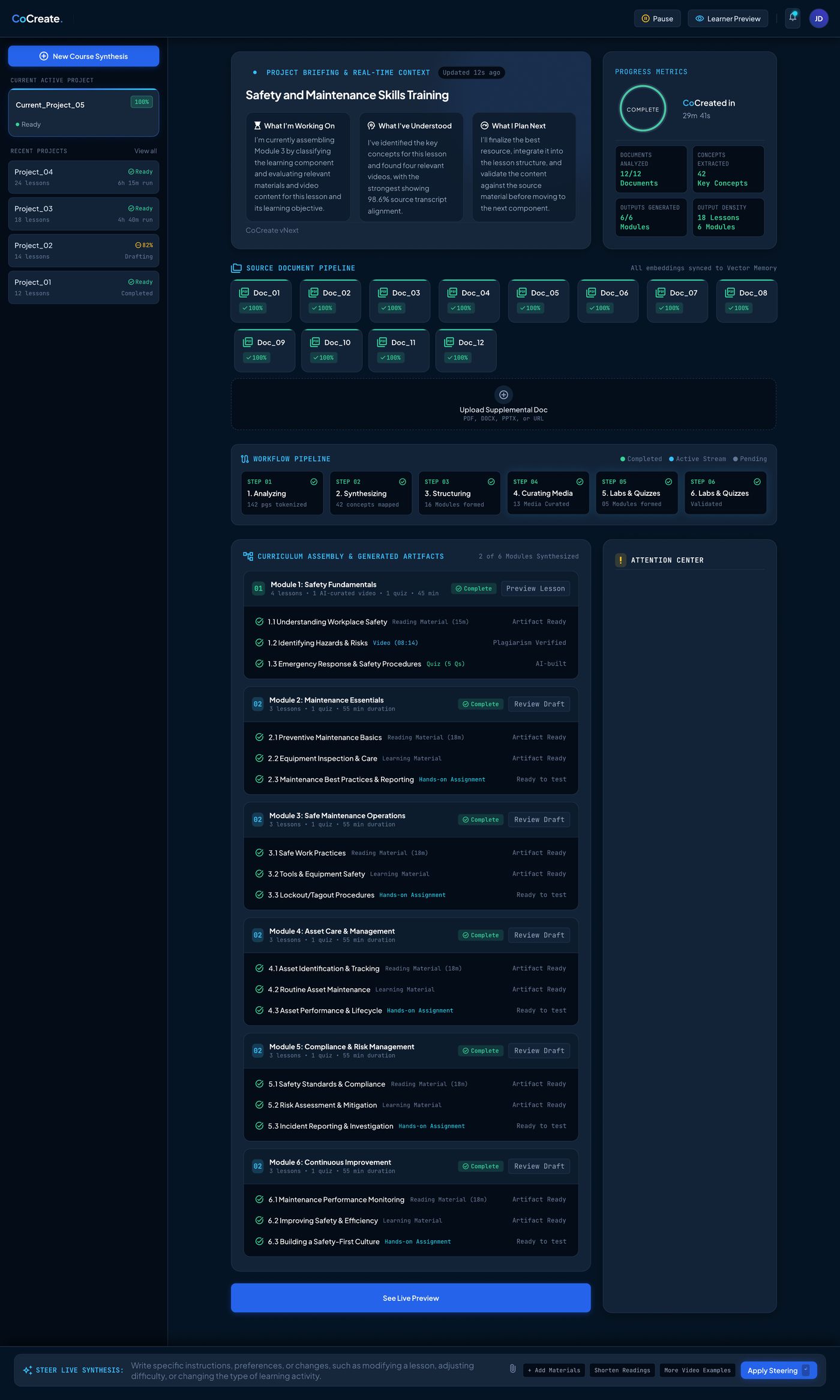
At 100%, all twelve documents are processed and all six modules are complete. "See Live Preview" shows the course exactly as a learner would experience it. Jordan can return to Creator's View to edit, Save Draft to hold it, or hit Publish for Admin Review: a deliberate human step that nothing skips.

Screen · Final Review & Live Preview
Final review dashboard showing all six modules complete with a see live preview button

Live Preview: the learner's view

The finished lesson plays exactly as a learner will see it, with the full module list still visible on the left for context. From here Jordan can move between lessons, save the draft to revisit later, or publish it for admin review.

Live preview of a finished lesson with video player and publish for admin review button
THE TRADE-OFF

How much runs on its own, versus how much stays in Jordan's hands

The core tension in CoCreate is between letting the AI move fast enough to be worth using, and keeping enough of the decision-making with Jordan that the output can actually be trusted.

RESOLUTION

CoCreate stays continuous, and nothing in the pipeline waits on Jordan by default. But control is layered back in at exactly the points that matter: steering scoped to what's unbuilt, flags that explain themselves instead of silently resolving, and one non-skippable human gate before anything reaches a learner.

→

Next to validate: whether narrated reasoning ("what I'm working on / what I've understood / what I plan next") actually reads faster than a status bar once Jordan has seen it a dozen times, or whether it becomes text he learns to skip.

→

Whether "Choose Fix" needs more than two recommended options once real batches surface a wider range of flags than a single mismatched video.

View live prototype